Choose meaningful activity
Set minimum volume, a dominance ratio and a stacking filter to focus the references shown for your instrument.
Order flow / Price-level references
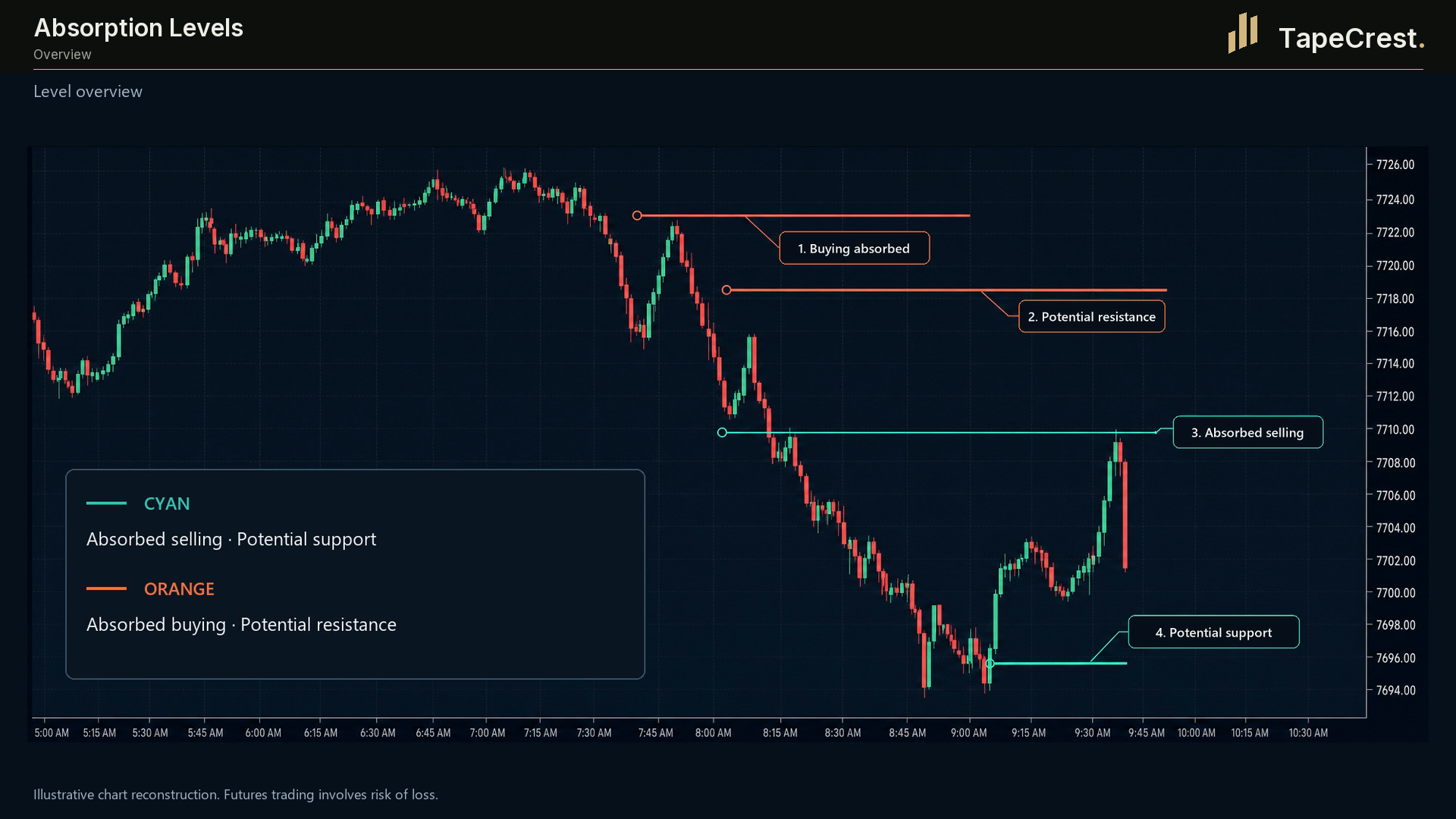
Turn concentrated bid/ask activity into horizontal levels. Then review what price does when it returns.
7-day trials at launch.No card required. No automatic charges. Join the launch list to hear when access opens.
What it adds
Absorption Levels compares bid-side and ask-side traded volume at a price. When activity meets your configured thresholds, it becomes a horizontal reference on the chart.
Use those references to organise a later review of price behaviour. The marked activity is an observation; how the market subsequently reacts is a separate part of your analysis.
Inside the tool
Set minimum volume, a dominance ratio and a stacking filter to focus the references shown for your instrument.
Adjust the lookback and maximum line count. Volume labels help explain why a particular reference appeared.
Optional approach and touch alerts draw attention to existing levels. Detection and price checks use bar-close calculations.
A practical workflow
Choose thresholds appropriate to the instrument, chart and data you are reviewing. Start with fewer levels so you can understand their origin.
Open the surrounding order flow. Review the bid/ask volume that qualified, its place in the range and its relation to the session map.
Assess the subsequent price response with your own criteria. A plotted line does not define an entry, stop or target.
Before you start
Product questions
A price must meet the configured minimum volume, bid/ask dominance and stacking conditions. The optional bar-extreme filter further restricts detection.
A marked level records qualifying activity. It does not establish that price held or will reverse. Review the surrounding market and your own criteria.
Lookback and recent-bars filters, together with the line-count cap, determine which levels remain visible. A break through a level does not automatically invalidate it.
At launch, each paid TapeCrest indicator or add-on will offer a seven-day trial, with no card required and no automatic charge. Public trial access is not open yet. Explore the tools and check their platform and data requirements here.
When trials open, your seven days will begin at the first successful activation of that product. Browsing, account creation and downloading will not start it. Reinstalling will not restart it.
Trial access expires. You choose whether to purchase the product; there is no automatic conversion or charge. Platform, market-data and external AI-model costs are separate from the TapeCrest trial.
Opening Range Breakout (ORB) is planned as a benefit included without extra cost in a qualifying package. Package details will be confirmed before launch. That benefit is separate from the seven-day trial policy for paid products.
Continue your workflow
Coming to TapeCrest
At launch, each paid indicator or add-on will offer seven days to explore it in your own setup. Find your tool, check the requirements and prepare a workflow that fits the way you work.
7-day trials at launch.No card required. No automatic charges. Join the launch list to hear when access opens.
Explore paid indicators and add-ons. Check platform, data and product requirements first.
Your seven days will begin with the product’s first successful activation. Reinstalling will not reset the clock.
Access expires after the trial. Continue only with a purchase you choose; no automatic charge follows.
Be there from the beginning
Join the launch list for TapeCrest indicators and add-ons. Get an email when your next trading tool is ready to explore.
Seven days to make it your own.
7-day trials at launch. No card required.
No automatic charges.
Still choosing? Tell us what you want to improve. We can help you find a starting point.
Built for NinjaTrader 8