Session references
Review prior highs and lows, weekly references, profile levels and VWAP together, with visibility settings for the information you use.
Session preparation / Key Levels + Market Agent
Bring session references onto the chart, then explore a connected briefing workflow built around the same market map.
7-day trials at launch.No card required. No automatic charges. Join the launch list to hear when access opens.
What it adds
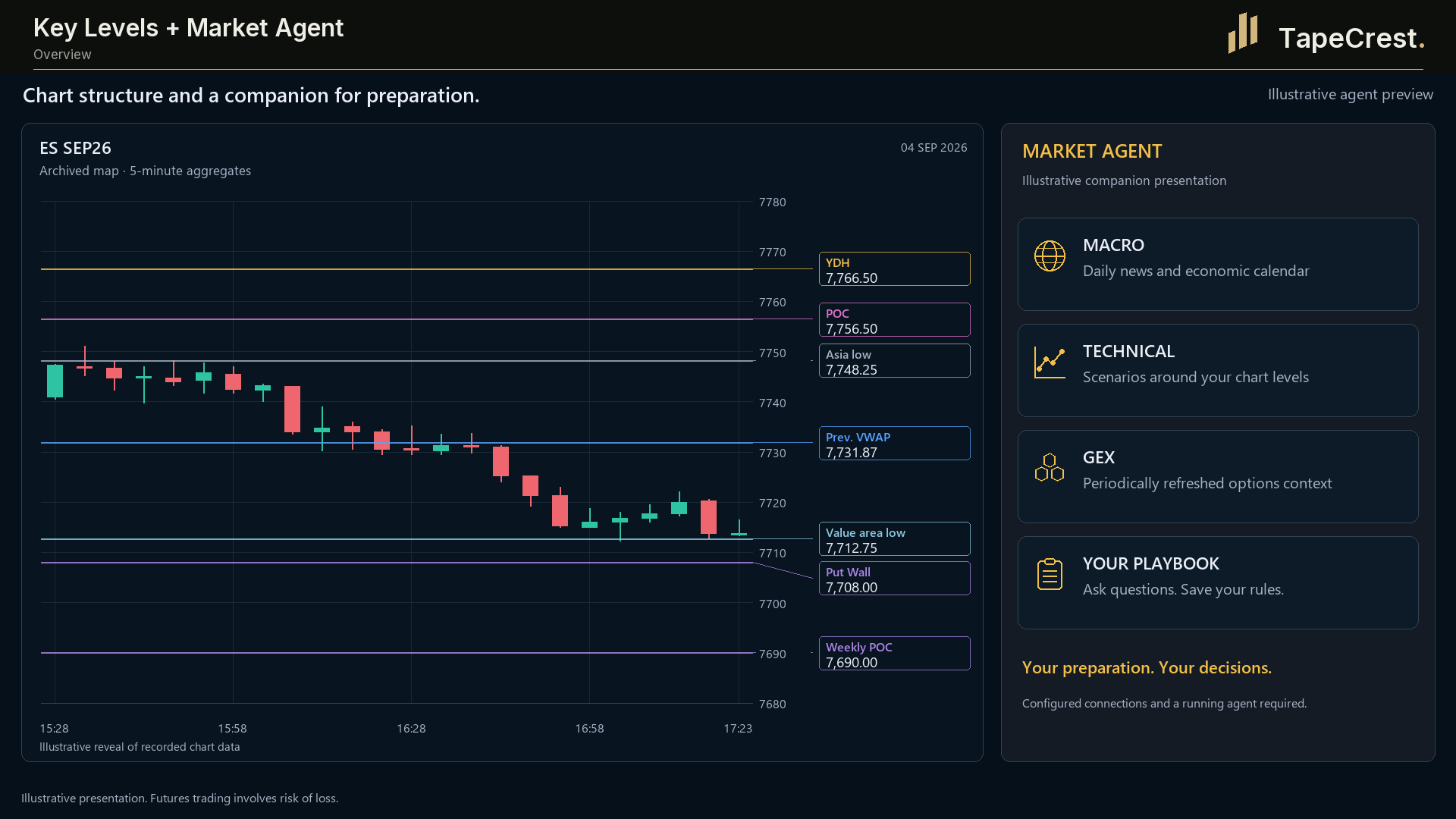
Key Levels gathers prior-session and weekly references, POC and value area, VWAP, Asia range and other price structures. Scored levels and zones help you organise the map you review before and during a session.
The connected Market Agent workflow uses structured chart information for scheduled session briefings and chart notes. We are preparing the TapeCrest pairing, including the English experience and package access.
Inside the tool
Review prior highs and lows, weekly references, profile levels and VWAP together, with visibility settings for the information you use.
Use scored levels, zones and a frozen day plan to keep your session references consistent as you move into chart analysis.
Explore session briefings and chart notes derived from exported market information. The agent adds interpretation that you assess alongside the original chart.
A practical workflow
Run Key Levels on the instrument and review the references that matter to your process. Check that the data is current.
The connected workflow reads structured chart information and can produce scheduled briefings, highlighted prices and notes.
Use OrderFlow Chart or Absorption Levels to inspect activity around those references. Keep interpretation and your trading decision with you.
Before you start
Product questions
Key Levels exports structured information from the live chart. The agent can use that map for scheduled analysis and write notes and highlighted prices back for the chart to display.
Yes. Certain profile calculations can fall back to an approximation without volumetric data. Confirm the data and precision needed for your use.
The connected workflow reads market information and produces briefings and chart notes. It does not place orders; you assess the interpretation and make the trading decision.
At launch, each paid TapeCrest indicator or add-on will offer a seven-day trial, with no card required and no automatic charge. Public trial access is not open yet. Explore the tools and check their platform and data requirements here.
When trials open, your seven days will begin at the first successful activation of that product. Browsing, account creation and downloading will not start it. Reinstalling will not restart it.
Trial access expires. You choose whether to purchase the product; there is no automatic conversion or charge. Platform, market-data and external AI-model costs are separate from the TapeCrest trial.
Opening Range Breakout (ORB) is planned as a benefit included without extra cost in a qualifying package. Package details will be confirmed before launch. That benefit is separate from the seven-day trial policy for paid products.
Continue your workflow
Coming to TapeCrest
At launch, each paid indicator or add-on will offer seven days to explore it in your own setup. Find your tool, check the requirements and prepare a workflow that fits the way you work.
7-day trials at launch.No card required. No automatic charges. Join the launch list to hear when access opens.
Explore paid indicators and add-ons. Check platform, data and product requirements first.
Your seven days will begin with the product’s first successful activation. Reinstalling will not reset the clock.
Access expires after the trial. Continue only with a purchase you choose; no automatic charge follows.
Be there from the beginning
Join the launch list for TapeCrest indicators and add-ons. Get an email when your next trading tool is ready to explore.
Seven days to make it your own.
7-day trials at launch. No card required.
No automatic charges.
Still choosing? Tell us what you want to improve. We can help you find a starting point.
Built for NinjaTrader 8