Order coordination
Copy Market, Limit, Stop Market, Stop Limit and MIT orders, including supported changes and cancellations.
Trade copier / Your own accounts
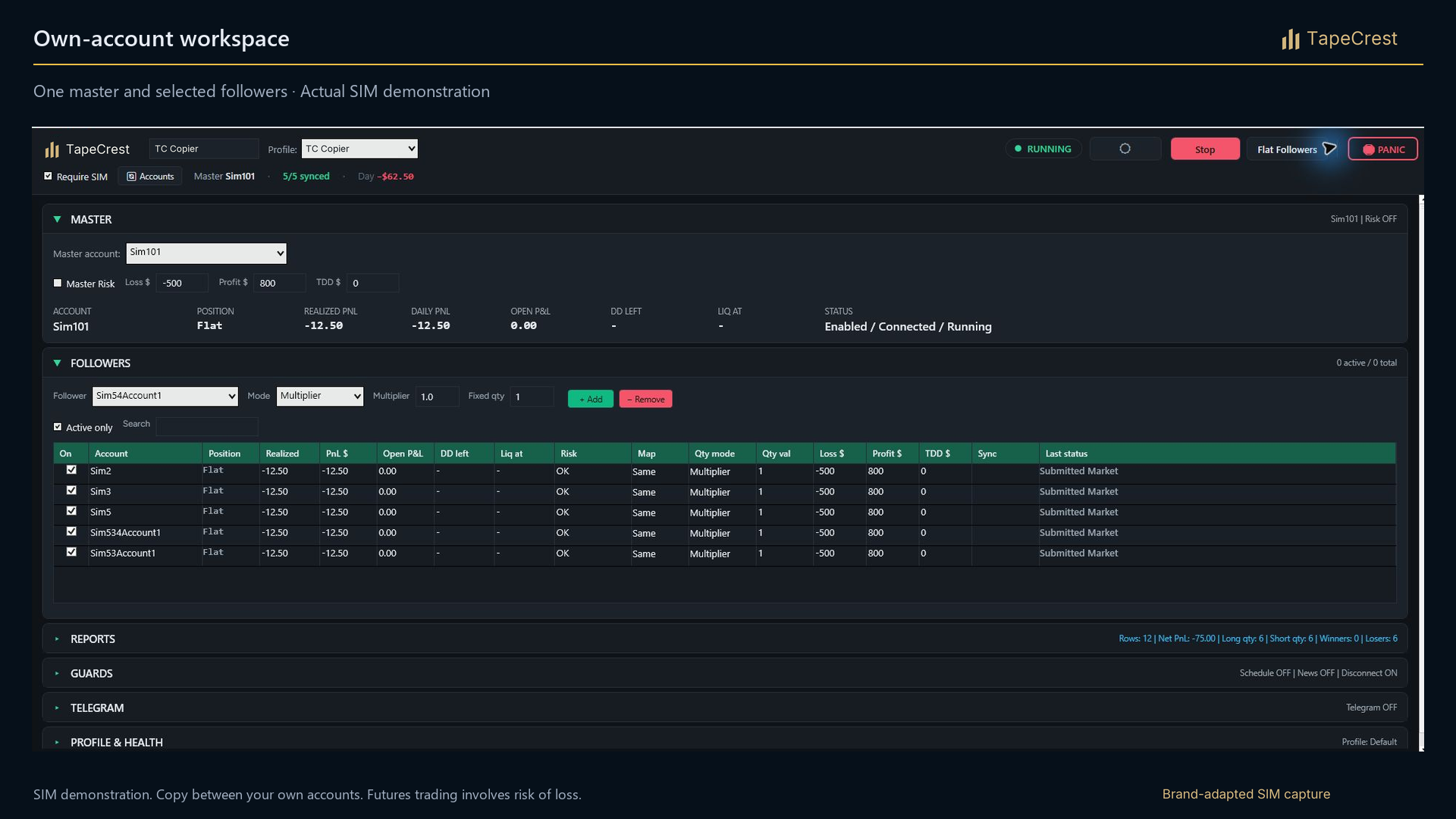
Place an order on your master account. Coordinate your connected followers with separate sizing, instrument mapping and account controls.
7-day trials at launch.No card required. No automatic charges. Join the launch list to hear when access opens.
What it adds
Managing several accounts creates a practical task: place the intended orders, keep track of changes and know what each account is doing. The Trade Copier is built around that workflow inside NinjaTrader 8.
Configure your own connected accounts as master and followers. Give each follower a fixed quantity or a multiplier, choose supported instrument mapping and review the setup before enabling copying.
Inside the tool
Copy Market, Limit, Stop Market, Stop Limit and MIT orders, including supported changes and cancellations.
Choose fixed quantity or a multiplier per follower. Same, Micro and Mini mapping let you configure supported contract pairs separately from quantity.
Set daily loss, daily profit and custom trailing-drawdown limits. Review locks, account status, setup validation and reporting from the interface.
A practical workflow
Connect your own eligible accounts in one NinjaTrader instance. Check provider permissions and start with flat accounts.
Set follower size and mapping, then inspect the setup preview. Mapping an instrument changes exposure independently of the quantity.
Test the intended workflow in simulation. During use, monitor each account’s status and orders; followers receive their own executions.
Before you start
Product questions
The workflow is intended for your own accounts connected in NinjaTrader 8. Whether an account may participate depends on the firm’s current rules, the account type and the platform connection. Confirm each before setup.
Yes. Set fixed quantities or multipliers per follower. Supported Micro/Mini mapping is separate from sizing, so review exposure in the preview before starting.
The copier initiates flattening and locks the affected follower until the scheduled daily reset. Master controls are separately configurable. Monitor the account and connection because exit orders still depend on execution.
At launch, each paid TapeCrest indicator or add-on will offer a seven-day trial, with no card required and no automatic charge. Public trial access is not open yet. Explore the tools and check their platform and data requirements here.
When trials open, your seven days will begin at the first successful activation of that product. Browsing, account creation and downloading will not start it. Reinstalling will not restart it.
Trial access expires. You choose whether to purchase the product; there is no automatic conversion or charge. Platform, market-data and external AI-model costs are separate from the TapeCrest trial.
Opening Range Breakout (ORB) is planned as a benefit included without extra cost in a qualifying package. Package details will be confirmed before launch. That benefit is separate from the seven-day trial policy for paid products.
Continue your workflow
Coming to TapeCrest
At launch, each paid indicator or add-on will offer seven days to explore it in your own setup. Find your tool, check the requirements and prepare a workflow that fits the way you work.
7-day trials at launch.No card required. No automatic charges. Join the launch list to hear when access opens.
Explore paid indicators and add-ons. Check platform, data and product requirements first.
Your seven days will begin with the product’s first successful activation. Reinstalling will not reset the clock.
Access expires after the trial. Continue only with a purchase you choose; no automatic charge follows.
Be there from the beginning
Join the launch list for TapeCrest indicators and add-ons. Get an email when your next trading tool is ready to explore.
Seven days to make it your own.
7-day trials at launch. No card required.
No automatic charges.
Still choosing? Tell us what you want to improve. We can help you find a starting point.
Built for NinjaTrader 8