Launching soonProfessional trading tools for NinjaTrader 8.Get notified at launch ↗

Order flow & trading tools for NinjaTrader 8

Bring structure
to your trading.

Read the activity behind price.
Coordinate your own accounts.
Prepare a clearer plan for the session.

7-day trials at launch.No card required. No automatic charges. Join the launch list to hear when access opens.

Built around NinjaTrader 8Futures · Order flow · Prop trading

Three perspectives. Your process.

Bring your session
into focus.

Look inside price. Coordinate your accounts. Build your session map. Choose a perspective to explore.

Inside the candle

Price tells a story.
See the detail.

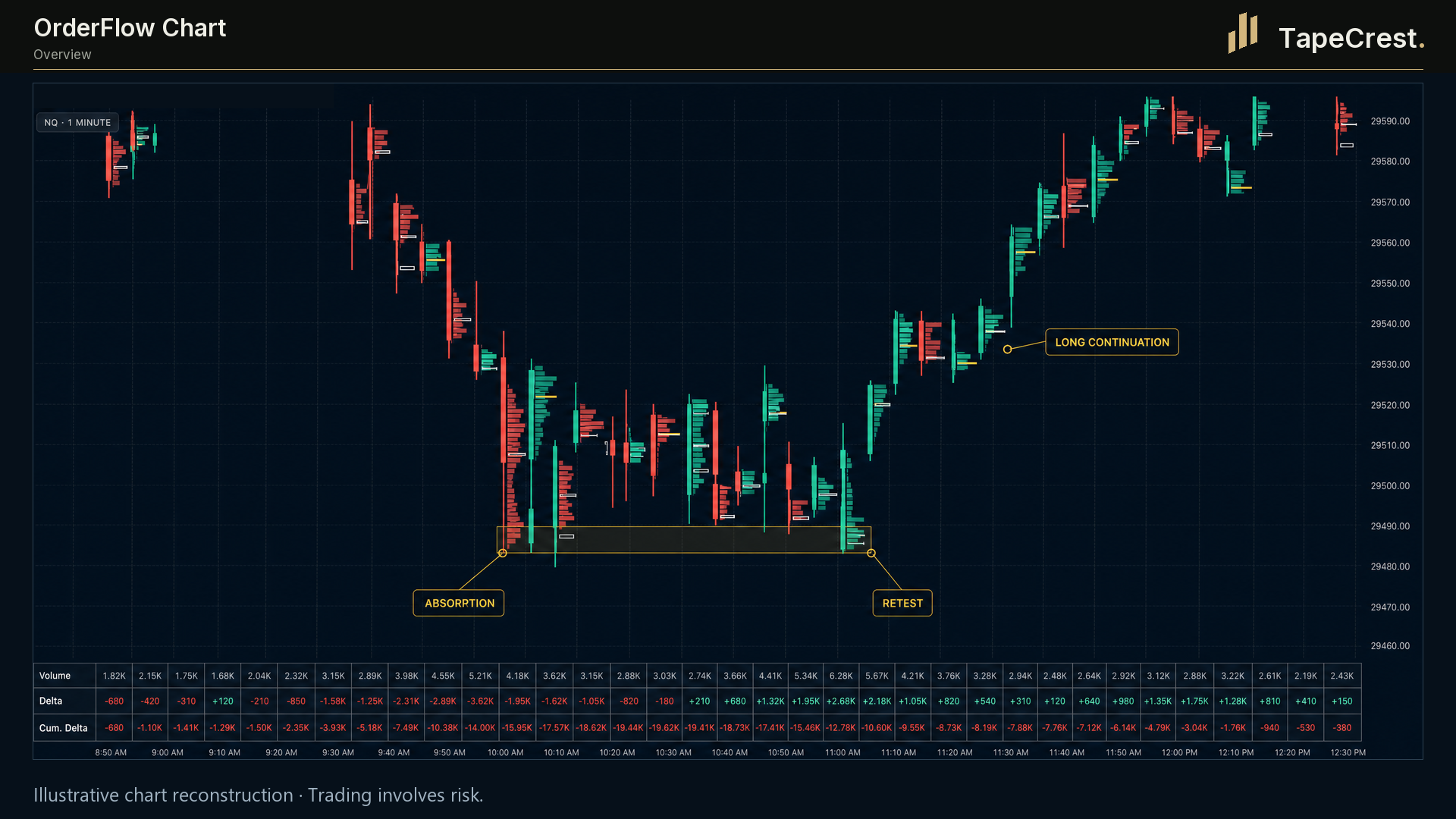
Bring traded volume, delta and imbalance into view. Use absorption references to examine the activity around the levels that matter to your process.

  • Volume and delta inside each bar
  • Imbalance and large-trade markers
  • Absorption reference levels

NinjaTrader 8 · Order Flow+ and suitable tick data required.

OrderFlow ChartPreview / 01
TapeCrest OrderFlow Chart illustrative presentation with per-bar volume, delta, imbalance and absorption context.
Activity → Context → Your decision
Illustrative chart presentation. Explore the detail in the expanded view.

Account-by-account control

One workflow.
Every account in view.

Coordinate order activity across your own connected accounts. Give each follower its own sizing, mapping and operating limits.

  • Fixed quantity or multiplier per follower
  • Same, Micro and Mini instrument mapping
  • Configurable account risk controls

NinjaTrader 8 · Your own accounts in one instance. Confirm provider permissions and test in simulation.

Trade CopierPreview / 02
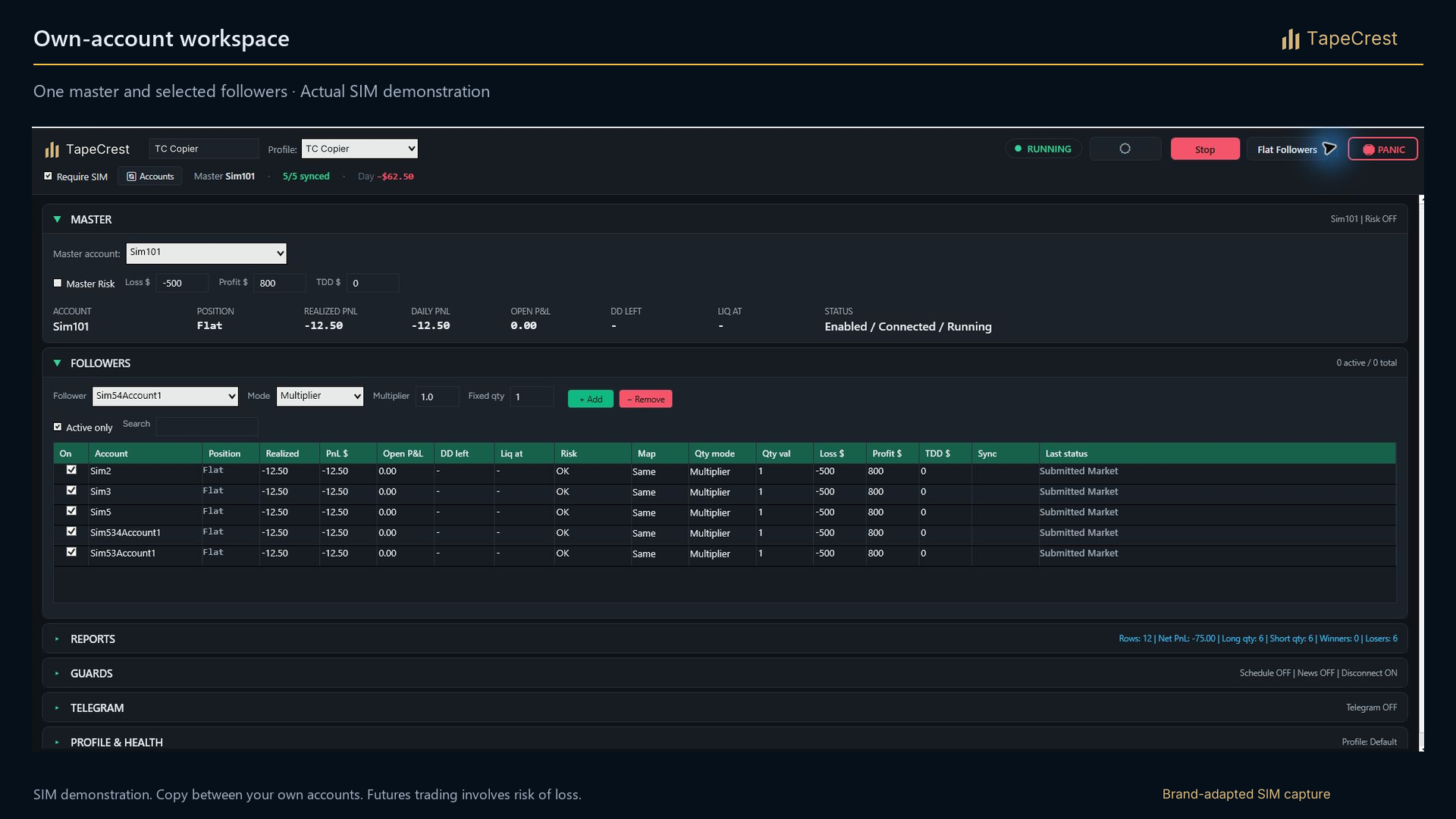
TapeCrest Trade Copier brand-adapted SIM capture showing master and follower accounts with individual controls.
Master → Followers → Your controls
Brand-adapted SIM capture. Fills and prop-firm rules depend on each account.

A session with structure

Build the map.
Prepare with purpose.

Organize session references and key zones on your chart. Explore the Market Agent pairing we are preparing to help put that market map into context.

  • Session and weekly reference levels
  • Value area, VWAP and key zones
  • Market Agent pairing in preparation

NinjaTrader 8 · Key Levels requires no Order Flow+. Agent setup and package details will be confirmed at launch.

Key LevelsPreview / 03
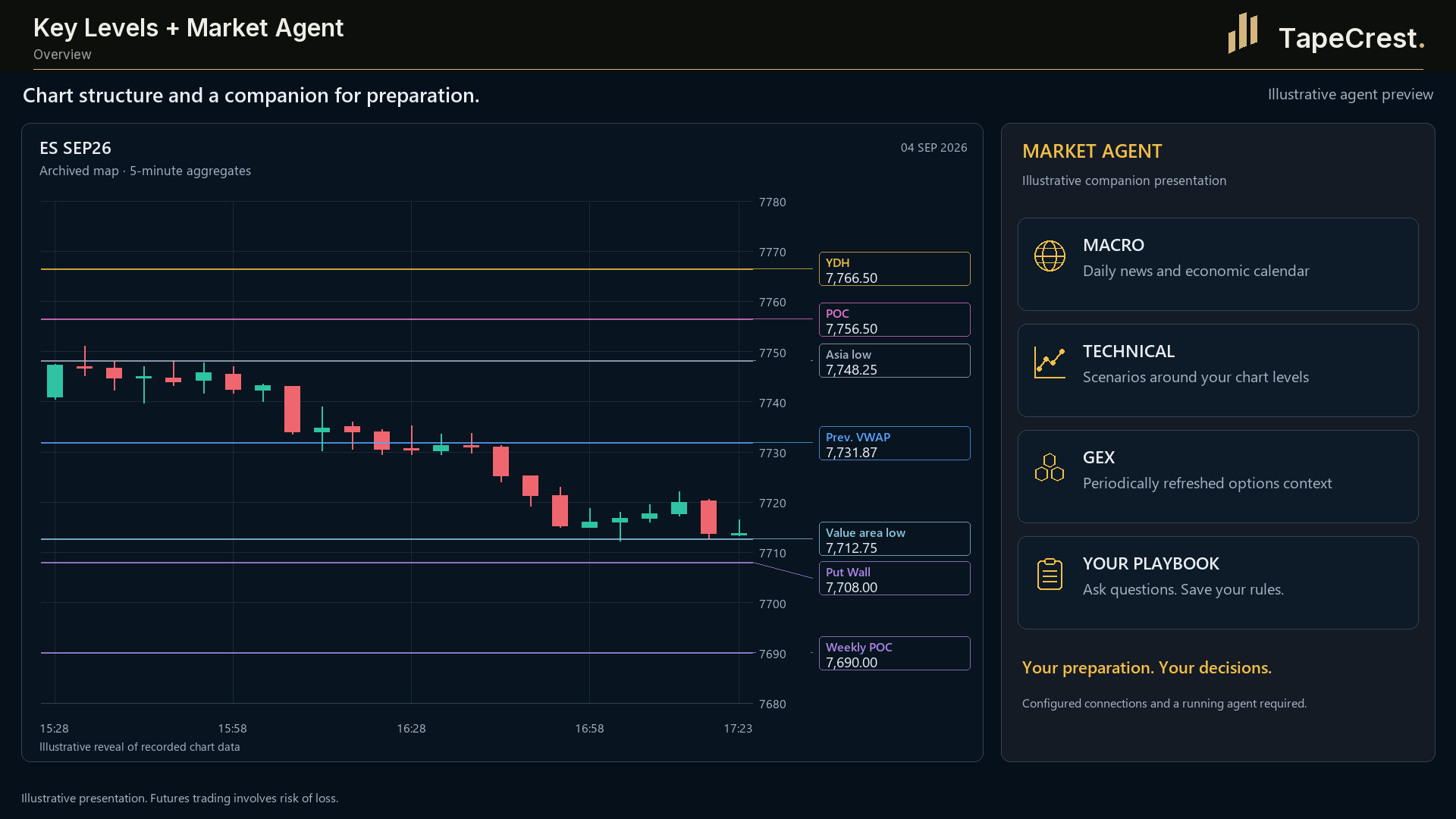
TapeCrest Key Levels illustrative chart presentation with session references, price zones and a market map.
References → Context → Your plan
Illustrative chart presentation. The connected TapeCrest agent experience is in preparation.

Launching soon NinjaTrader 8

7-day trials at launch. No card required.

01 / Read the market

See inside
the candle.

Price shows you the move. Order flow helps you examine the activity behind it: what traded, where volume built and how price responded.

OrderFlow Chart

Turn market activity
into something you can read.

Bring bid and ask volume, delta and imbalance into your NinjaTrader chart. Move from a candle’s shape to the trading activity at individual prices.

  • Bid and ask volume at each price
  • Delta and imbalance views
  • Footprint detail alongside the price chart
Join the launch list Explore OrderFlow Chart

7-day trials at launch.No card required. No automatic charges. Join the launch list to hear when access opens.

ORDERFLOW CHARTNINJATRADER 8
OrderFlow Chart: overview. Illustrative presentation; TapeCrest presentation branding.
Illustrative chart presentation · For explanation.
Your setup

NinjaTrader 8, with Order Flow+. Historical analysis requires suitable tick data and the appropriate Tick Replay setup. Check the requirements for your data connection before choosing the tool.

ABSORPTION LEVELSNINJATRADER 8
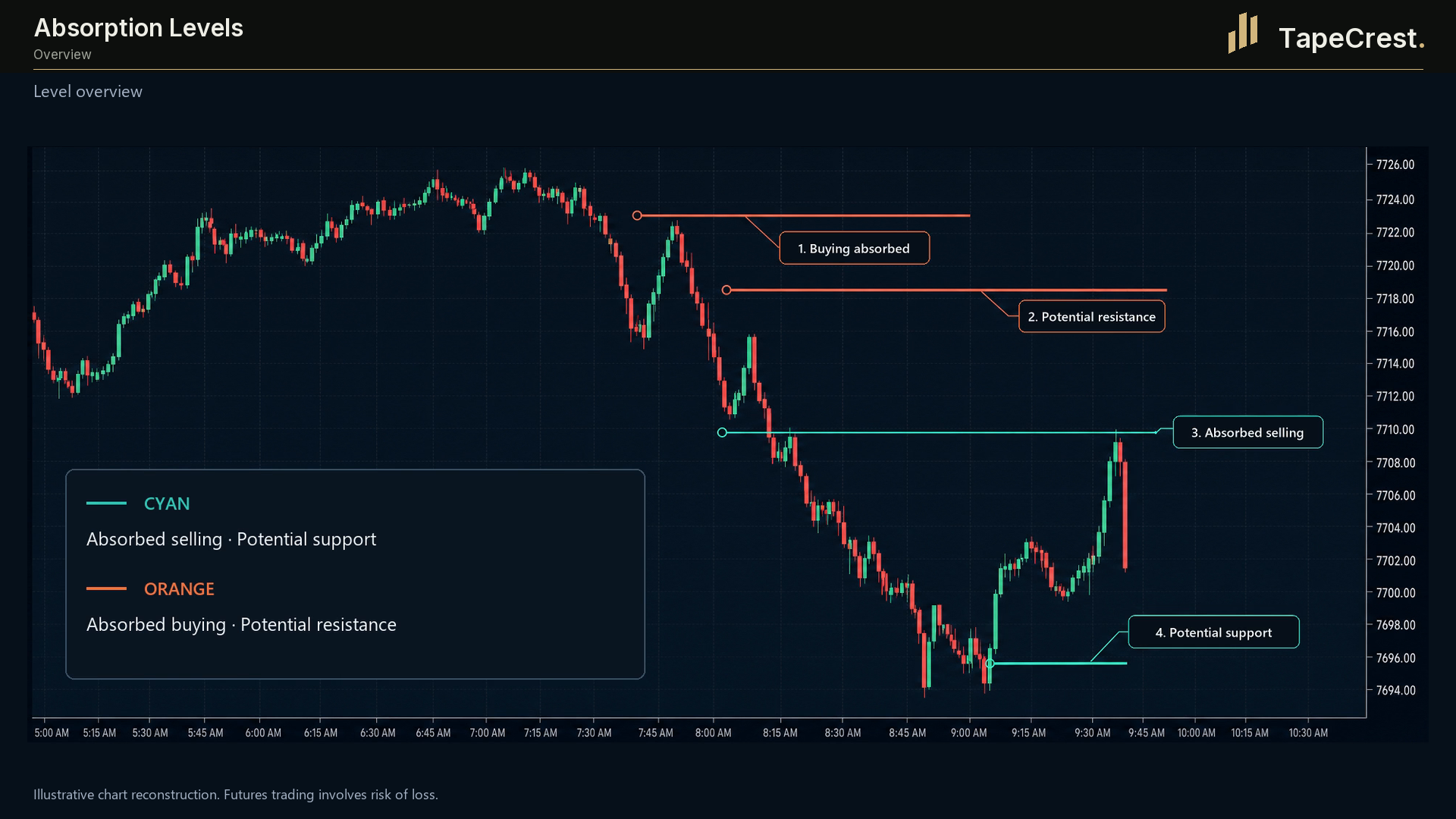
Absorption Levels: overview. Illustrative presentation; TapeCrest presentation branding.
Illustrative chart presentation · For explanation.

A closer look / Absorption Levels

Give concentrated activity
a place on your chart.

Turn concentrated bid and ask activity into price-level references. Review how price responds when it returns, alongside the session structure and your trading criteria.

Built for NinjaTrader 8 with Order Flow+. Historical analysis also depends on suitable tick data and configuration.

Join the launch list Explore Absorption Levels

7-day trials at launch.No card required. No automatic charges. Join the launch list to hear when access opens.

02 / Coordinate your accounts

Your accounts.
One coordinated workflow.

Managing your own futures accounts adds another layer to the session. Give that work a dedicated place, with clear account settings and controls.

Trade Copier

More accounts.
A clearer operating view.

Coordinate order activity from a leader account to your own follower accounts inside NinjaTrader. Configure the size, instrument mapping and risk controls for each account.

  • Fixed quantities or a follower multiplier
  • Order modifications and cancellations copied
  • Same-contract, micro and mini mapping
  • Configurable controls for each follower
Join the launch list Explore Trade Copier

7-day trials at launch.No card required. No automatic charges. Join the launch list to hear when access opens.

TRADE COPIERNINJATRADER 8
Brand-adapted SIM capture of the TapeCrest copier workspace, with account quantities, P&L and controls preserved from the original.
Brand-adapted SIM capture · Original account data preserved.
Account fit

Accounts must be connected in the same NinjaTrader instance. Use accounts you own and are permitted to copy between. Check your provider’s current rules and test the configuration in simulation. Execution and fills can differ across accounts.

03 / Prepare your session

A map for the session.
Context for your decisions.

Start the session with clear reference points. Bring the levels you watch into a structured view, then study the context around them.

Key Levels + Market Agent

Preparation deserves
its own workspace.

Key Levels brings session references and support and resistance zones onto your chart. Market Agent connects that market map with session briefings and chart notes, adding context to your preparation.

  • Prior-session and weekly references
  • VWAP, point of control and value area
  • A connected workflow for briefings and chart notes
Join the launch list Explore Key Levels

7-day trials at launch.No card required. No automatic charges. Join the launch list to hear when access opens.

Coming to TapeCrest. The Key Levels and Market Agent pairing is in preparation. Package contents, English setup and access will be confirmed before launch.
KEY LEVELSNINJATRADER 8
Key Levels + Market Agent: overview. Illustrative presentation; TapeCrest presentation branding.
Illustrative chart presentation · For explanation.
Your setup

Key Levels is built for NinjaTrader 8. Market Agent is a companion application with separate setup requirements. Review the product details and your data configuration when discussing the TapeCrest pairing.

Built around your process

For the futures
prop trader.

Your market view, account setup and session plan belong in one considered process. Explore how TapeCrest tools can support the work around your own evaluation and funded accounts.

Explore the prop trading workflow
Join the launch list Explore Trade Copier

7-day trials at launch.No card required. No automatic charges. Join the launch list to hear when access opens.

  1. Make the market readable.

    Use order flow and absorption to examine the activity around your trading criteria.

  2. Know your account setup.

    Review permissions, quantities and controls before connecting follower accounts.

  3. Prepare with intention.

    Map your reference levels and review your plan before the session begins.

The wider collection

Add the perspective
your process needs.

A focused setup starts with a purpose. Add another view when it answers a useful question.

Session context

Market Profile

Study where time and volume accumulated. Bring TPO structure, a volume profile, point of control and value area into your session preparation.

NinjaTrader 8. Order Flow+ is not required; historical precision depends on your data and configuration.

Get notified about Market Profile

7-day trials at launch.No card required. No automatic charges. Join the launch list to hear when access opens.

MARKET PROFILENINJATRADER 8
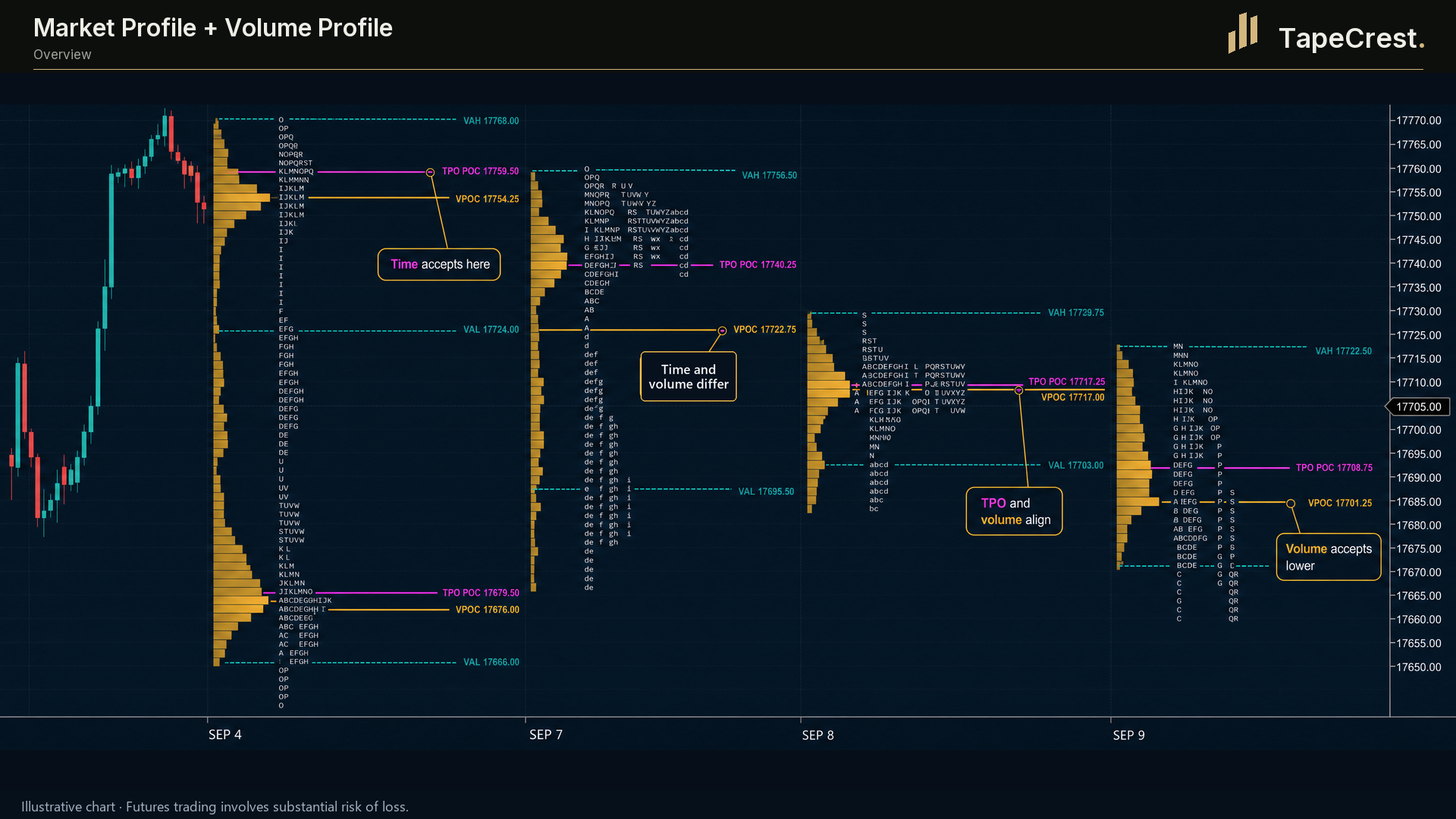
Market Profile + Volume Profile: overview. Illustrative presentation; TapeCrest presentation branding.
Illustrative chart presentation · For explanation.

The visual collection includes illustrative chart presentations and brand-adapted SIM captures, labelled throughout.

Explore before you decide

Seven days.
Your own process.

At launch, each paid TapeCrest indicator or add-on will offer seven days to explore it in your own setup. Start by finding the tool that fits your process and checking its requirements.

Join the launch list

7-day trials at launch.No card required. No automatic charges. Join the launch list to hear when access opens.

Three short questions can help you choose a starting point.

01

Choose your tool

Explore order flow, account coordination or session preparation. Check the platform and data requirements first.

02

Activate when you are ready

When trials open, your seven days will begin with the first successful activation of that product, giving you time to prepare your setup.

03

Decide after seven days

Continue with a purchase you choose, or let access expire. No card is collected for the trial and no purchase happens automatically.

Public trials and downloads are in preparation. Explore the product guides now, or join the launch list to hear when your tool is ready.

Ask the TapeCrest team

The practical details

A few things
to know.

Still have a question?
Ask us a question ↗

Which platform are the tools built for?

The initial collection is built for NinjaTrader 8. Data and feature requirements vary by tool. Check the notes above and share your platform version and data provider with support when discussing a setup.

Where should I start with order flow?

Start with a question about the chart. OrderFlow Chart helps you examine volume inside a bar, delta and imbalance. Absorption Levels turns qualifying bid/ask activity into price-level references. Market Profile adds session context. Explore one view, understand its settings and practice reading it within your own process.

Can I use the copier with my prop accounts?

Confirm your prop firm's current rules, your account type and your platform connection. The copier coordinates your own accounts connected in the same NinjaTrader instance. Check permitted copying, contract mapping and quantities, start flat and validate the setup in simulation. Explore the prop trading workflow ↗

Does the copier follow my firm's drawdown rules?

The copier offers configurable daily loss, daily profit and custom trailing-drawdown controls. Its custom drawdown uses the peak daily P&L measured by the copier. Compare that calculation with your firm's actual rules and set your own operating limits; the two methods may differ.

Do I need NinjaTrader Order Flow+?

OrderFlow Chart and Absorption Levels require Order Flow+ volumetric data. The copier and Market Profile do not. Key Levels can work without it, with some profile calculations approximated without volumetric data. A suitable market-data connection and historical tick coverage are still important. Each product page explains its setup.

How do Key Levels and Market Agent fit together?

Key Levels builds the market map on a live chart. The connected agent can use exported market information to prepare session briefings and return chart notes. The workflow needs a separate agent setup and model service. The TapeCrest pairing is being prepared; its included licences, language support and installation will be confirmed before purchase. See the workflow and requirements ↗

Do these tools make trading decisions for me?

The analysis tools organize market information; the copier mirrors the order activity you choose to initiate. Market Agent provides model-generated interpretation. Your trading plan, risk management and decisions remain yours. Historical observations do not guarantee future outcomes.

How does the 7-day trial work?

At launch, each paid TapeCrest indicator or add-on will offer a seven-day trial, with no card required and no automatic charge. Public trial access is not open yet. You can explore the tools and check their platform and data requirements here.

When would my seven days begin?

When trials open, the seven-day period will begin at the first successful activation of that product. Browsing, account creation and downloading will not start it. Reinstalling the product will not restart its trial.

What happens when the trial ends?

Trial access expires. You can choose whether to purchase the product; the trial does not turn into a paid subscription and does not create an automatic charge. A new installation does not create another seven-day period.

What is included, and what needs a separate setup?

The planned trial covers paid TapeCrest indicators and add-ons. NinjaTrader access, market data and any external AI-model usage remain separate. Opening Range Breakout (ORB) is planned as an included benefit in a qualifying package. Package details and the connected Market Agent experience will be confirmed before launch.

Be there from the beginning

Your next chapter.
Starts here.

Join the launch list for TapeCrest indicators and add-ons. Get an email when your next trading tool is ready to explore.

Seven days to make it your own.
7-day trials at launch. No card required.
No automatic charges.

Still choosing? Tell us what you want to improve. We can help you find a starting point.

Built for NinjaTrader 8

How can we help?

Just a launch notification. No account or payment needed.

YOUR STARTING POINT

What would you like
to see more clearly?

Choose the question closest to your current focus.

Your area of focus

Product capture

TapeCrest visual presentation. See the image caption for its source and data context.